

What is SVG and why it is so cool
It’s been a long time since web designers changed their format preferences when it comes to using images and icons on the site. A raster image (PNG, JPEG or basically any other format made of pixels) is no longer the first choice of today’s web designer.
Of course, not every image, and especially a photograph, can be an SVG. The reason why is in the description of SVG which stands for scalable vector graphic. In other words, the object is made of multiple vector shapes, and not pixels. This means that no matter how you scale an SVG image up and down on the page, the image quality stays highest at all times, which makes it the best choice for responsive web design.
There are many other benefits of using SVGs versus any other raster formats. One of the most important benefits is the file size. Not only you get a higher resolution image, but you also get a smaller file size which means your image (and ultimately the page) loads faster.
Compare:
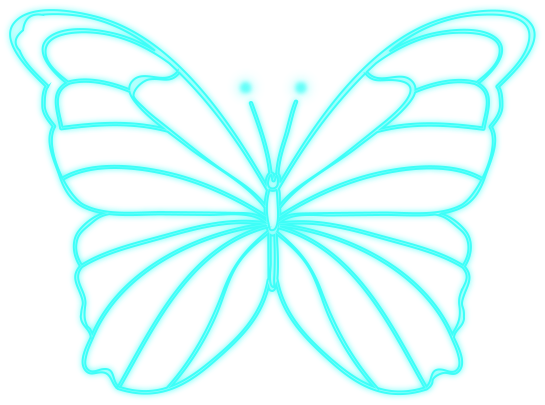

On the right (the bottom on mobile), the butterfly is exported as PNG and its size is 600 KB, while on the left (the top on mobile), the butterfly is exported as SVG and its size is only 220 KB.

The other benefit is that SVG file displays on the page using the <img> tag or as an <svg> code which means you can edit the image not only in design editing programs, such as Adobe Illustrator, but also in any text/code editor. With editing through CSS, you can also control various properties such as width, height, color, stroke, size, and more.


And when pure <svg> code is loaded on the site, it eliminates the HTTPS requests needed to load an image file. As a result, SVG loads faster, as I already mentioned above.
Let’s talk animation
Not only SVG is a great candidate for an image, but it also is a great choice for animation. Of course, I am not talking about complex interactive animations made in Adobe After Effects or Adobe Animate. Animated SVGs would be a perfect candidate to replace GIFs. I use them a lot not only to animate icons, but also to make individual animated vector graphics on websites.
I personally absolutely dislike using GIFs on websites (probably because I just love SVGs so much) for the following reasons.
- They are not responsive. Here is an example of a GIF. Try zooming it in and watch this GIF become pixelated.

Now look at animated SVG. No matter how much you scale up, the edges of this butterfly will always stay crisp. To sum up, animated SVGs, just like static SVGs, are resolution-independent, and their dimensions are not fixed.

2. GIFs just like JPEGs do not have an option of easily handling transparency. Even if you do find a way of removing background from your foreground (trust me, this will take quite some time), the effect is not the same as with SVGs.


For example, take a look at these bubbly icons. Bubble on the left (the top on mobile) is a GIF, while bubble on the right (the bottom on mobile) is an animated SVG. Both have transparent backgrounds. The issue with GIF becomes obvious when you scale up and see how crisp edges become pixelated and even blurry.

Why does it happen with GIFs and does NOT happen with animated SVGs? Transparency in GIF images is binary. This means that each pixel is either transparent or fully opaque. And the object, just like in raster images, is made of pixels, and not vector shapes.
You probably also noticed that in SVG the bubbles move way smoother, while GIF animation has tons of hiccups. That happens because when you look at GIF, you are basically looking at a sequence of images that just can’t be smooth. Standard GIFs run between 15 and 24 frames per second.
Now, let’s pretend we want to modify this animation and let’s say change the fill color and make the bubbles move slower. No matter what SVG animation tool you’re using, it will take you seconds to adjust key frames and change fill color.
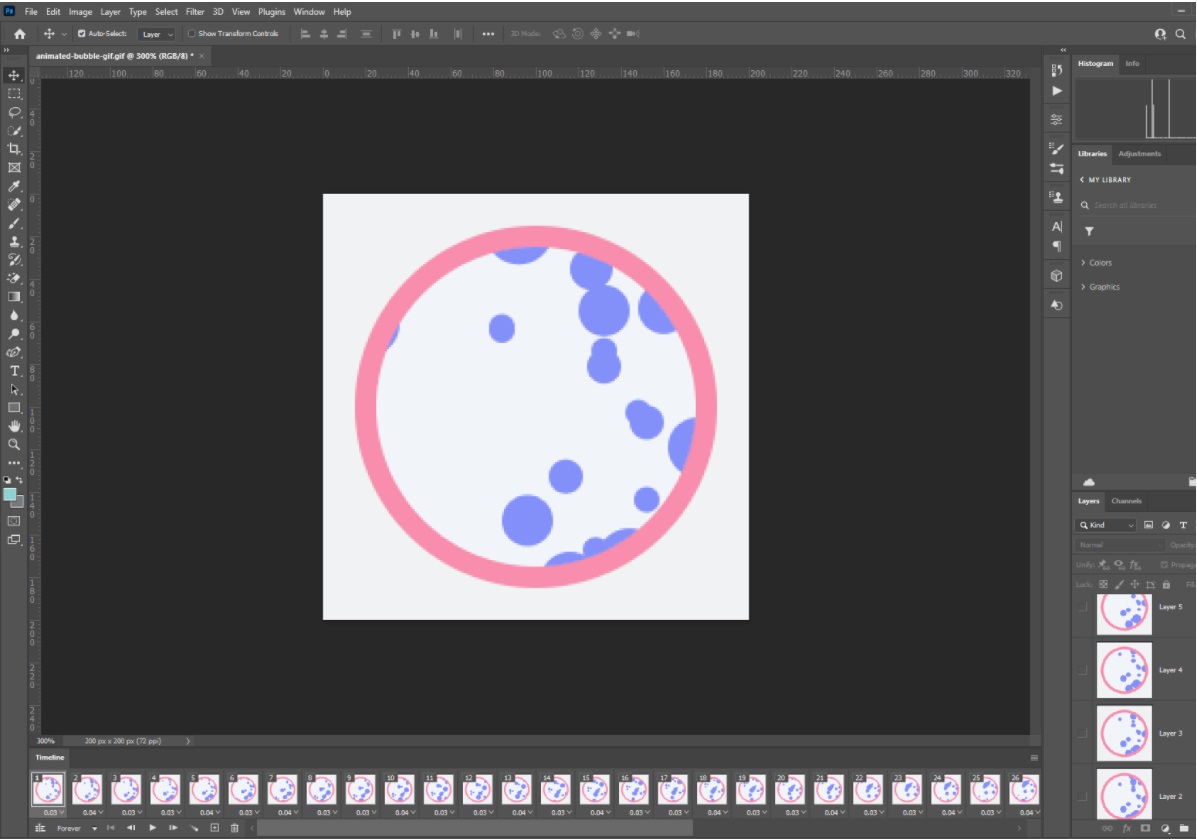
This is a screenshot of the animation timeline as created in Photoshop (Motion workspace). With GIF, you would have to modify every single frame just to change one small thing. Let alone complex tasks, such as for example, changing direction of an animation or making it transform to another shape. To sum up, this would turn into a nightmare for any designer and developer. And certainly, no one wants to spend hours on animating a single icon.
Just to sum up, SVGs can and should replace GIFs in many places, just like they should replace other raster image formats.
And as a bonus, I am attaching this SVG animation I made for Miles Technologies Design Library in SVGator, my personal favorite SVG animation tool.


Related Posts

9 Key Principles of “Good to Great” Design
Appropriate UI Design enables visitors to do what they came to do, what they…